NetNada - November 4 2026 Product Release




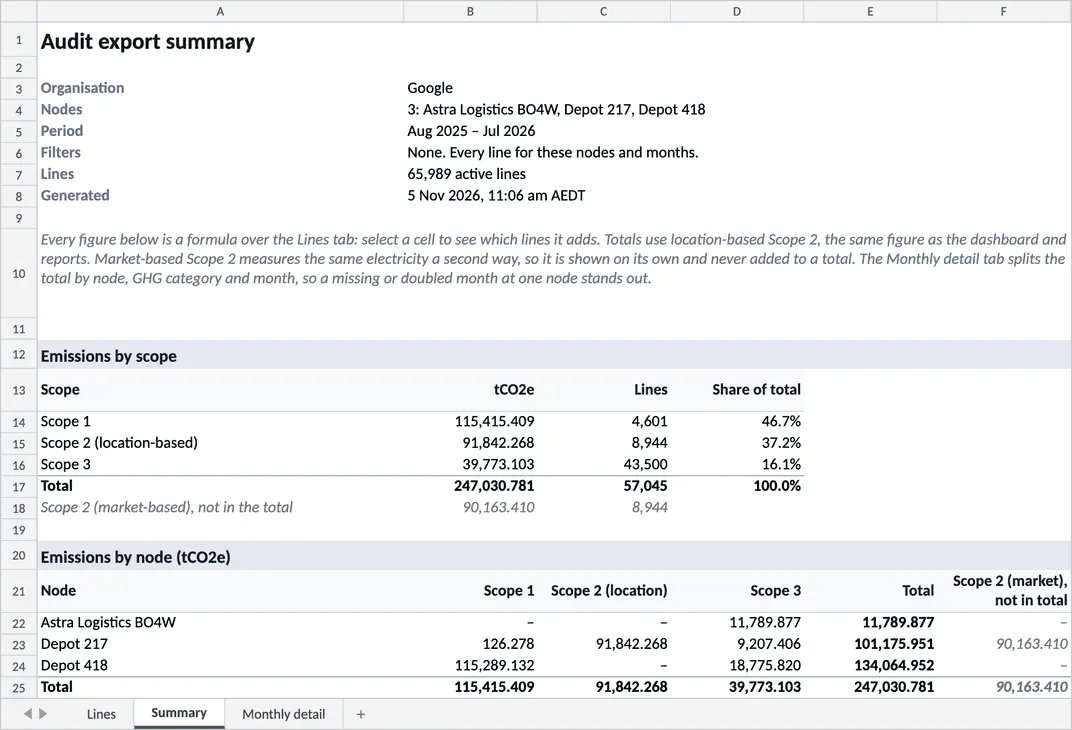
The Audit table download is now an Excel workbook. Its new Summary and Monthly detail tabs show totals by scope, site, category and month, so a missing or doubled month stands out. Home no longer times out on big accounts, and the Emission Factors page shows where each factor comes from.
Release window: October 22 to November 4 2026 · Environments: Production
The Audit Download Is Now an Excel Workbook
Download on the Audit table now gives an Excel workbook of exactly what the table shows, filters included.
What's new
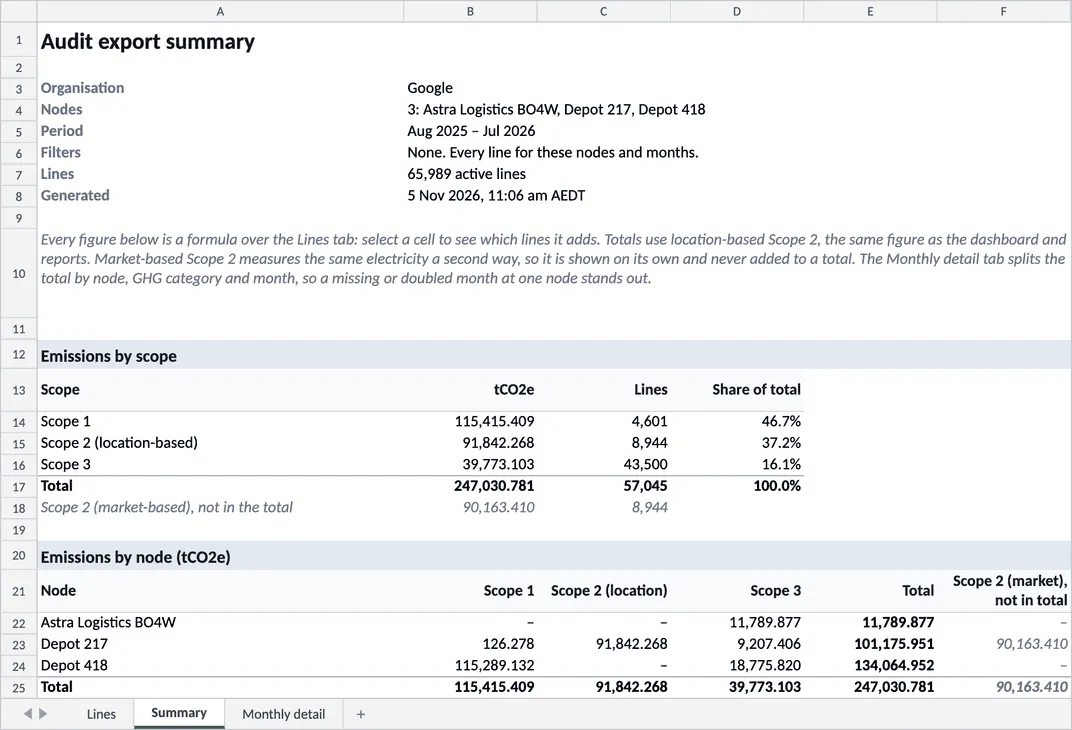
- Summary tab — totals by scope, site, month and category, and every figure is a formula you can trace
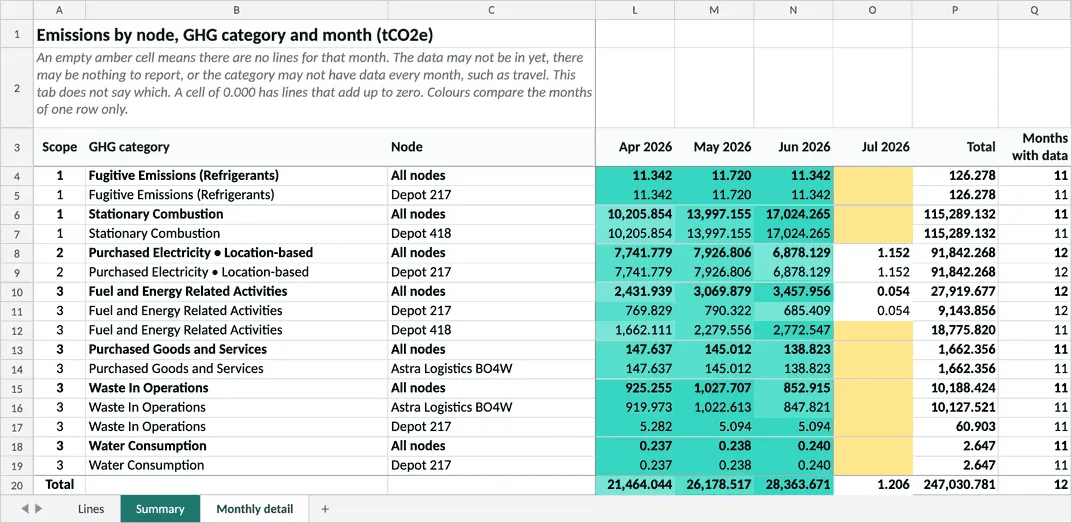
- Monthly detail tab — lists every site and category by month. Empty months are amber, and each row is shaded from white to teal, so a month loaded twice stands out
- Filters respected — the workbook contains exactly the rows the table shows
Worth knowing: the download is Excel only now, with no CSV option. Only White Label admins can include deleted records; everyone else gets active records.
The Monthly detail tab splits the total by site, category and month. In this example only July’s electricity has data, so the other July cells are amber.
Both screenshots are from a staging test account with generated data.
The Audit table also shows its rows first now. Total Emissions, Total Activity and the row count fill in a moment later, so the table no longer waits for them.
Emission Factors Show Their Source
Analyse > Emission Factors now opens on the By emission factor tab. Each factor shows a badge for its source, such as NGA, DESNZ or EPA, with its year and region underneath.
Calculators
- Zero readings now save instead of failing — a 0 now saves as 0 tCO2e, and the month counts as covered, in refrigerant top-ups and on the stationary combustion template. Before, the refrigerant upload failed and gas or fuel rows were skipped. Older files keep the old result: delete and re-upload them, or use Recalculate
- Spend lines change category less often — on purchased goods and capital goods spend uploads, the AI now moves a line to another GHG category only when it is at least 90% sure, up from 70%. Existing lines stay put
Home and Data Completeness
Home stopped loading on some big accounts because the Data Completeness card took 20 to 45 seconds. The card is off Home now, and Home loads again. The score is still available under Analyse > Data Completeness, although on very large accounts that page can still take a while.
Files and Submissions
Files & Submissions now loads one page of files at a time instead of every file, and the newest uploads come first. Search, filters, sort and Select all still cover every page. A bulk download now takes up to 1,000 files at a time.
Supply Chain
- Suppliers can upload Word files — file questions in NetNada’s supplier templates now accept Word documents, and a refused file says why. In Form Templates, the allowed file types are now tick boxes. A client’s copy of a template keeps its old file types, so tick Word in Form Templates to allow it
- Magic link stays open to copy — Resend magic link > Get link to send myself now keeps the link on screen until you click Done. Each resend stops the previous link, including the one the supplier already has
Good to Know
Since October 23, a CSV upload fails if any number cell has no digits, such as a lone ”-” or ”$”. Replace these with a number before uploading.
If you notice anything unexpected post-release, please share the tenant/org, page URL, steps to reproduce, and a screenshot if possible.
Making this planet better, one sprint at a time. 🌏
Want to see these features in action? Book a demo today.
Start Your Climate Reporting Journey
Join 1,000+ Australian businesses using NetNada for carbon accounting and sustainability reporting.