NetNada - February 11 2026 Product Release



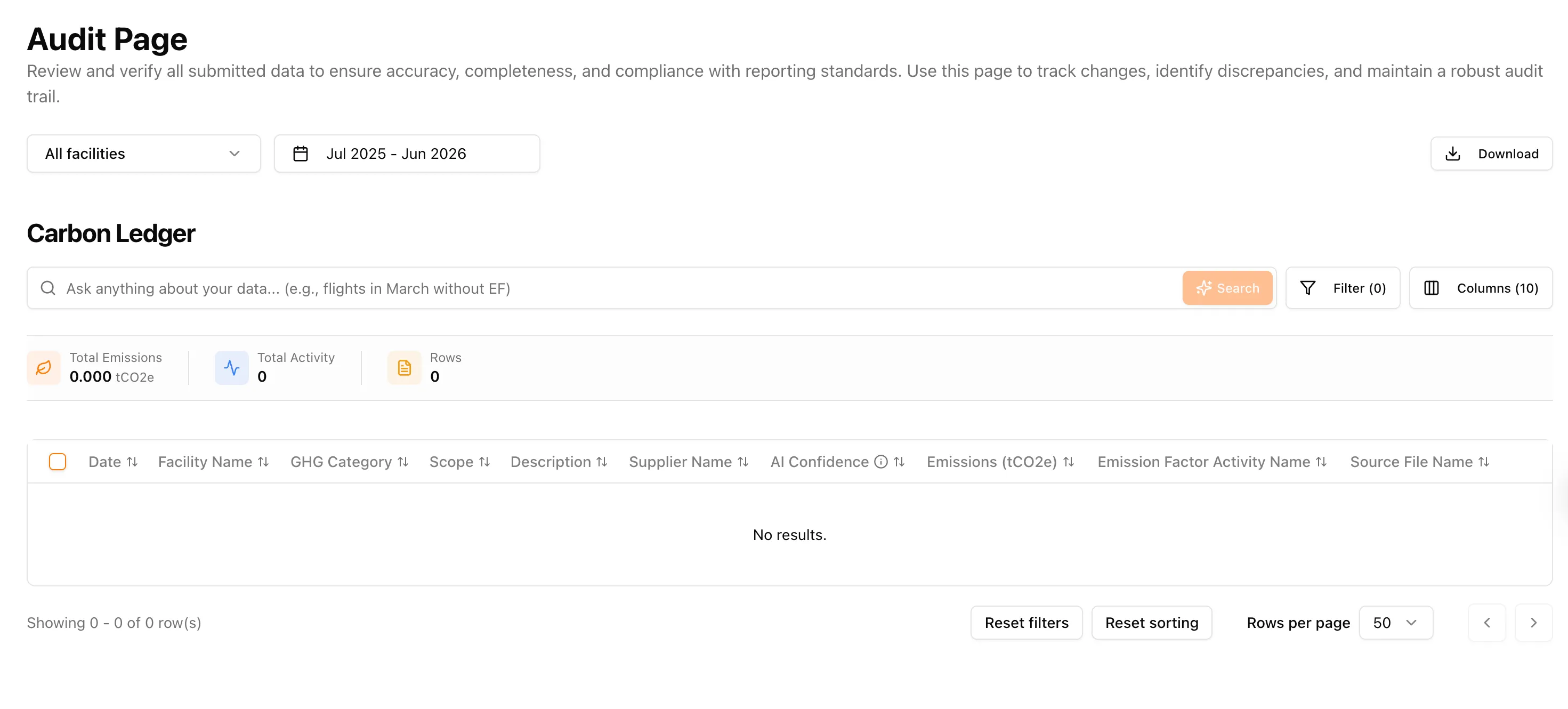
This sprint is all about making your carbon data easier to find, easier to fix, and easier to trust. We’ve rebuilt the Carbon Ledger from the ground up, made NetNada AI smarter and more empathetic, and shipped a handful of quality-of-life improvements that remove friction from everyday workflows.
The Carbon Ledger, Rebuilt
The Audit Page has been completely redesigned. At its core is a new AI search bar where you can type plain English queries like “flights in March without an emission factor” and the table applies the correct filters for you. It even generates a quick insight about the matching results.
For sustainability teams managing thousands of transaction lines across multiple facilities, finding a specific data point used to mean scrolling, filtering, and cross-referencing. That’s time you could spend on analysis, not administration. The rebuilt Carbon Ledger treats your emissions data like a searchable database — because that’s exactly what it should be. Whether you’re preparing for an NGER submission, responding to an auditor’s query, or investigating a Scope 3 data gap, the answer is now a sentence away.
Beyond search, there’s a full filter drawer that lets you slice by date range, facilities, scopes, GHG categories, suppliers, confidence scores, data source, and voided status. A column selector lets you pick exactly which fields are visible, and a summary bar at the top shows total emissions, activity totals with mixed unit breakdowns, row count, and selected count in real time.
You can now select all matching records across pages and perform bulk actions: edit the GHG category, swap the emission factor, delete rows, or export. Every column is sortable, pagination controls let you set your preferred page size, and clicking any row opens a detailed drawer.
NetNada AI Gets Smarter — and Kinder
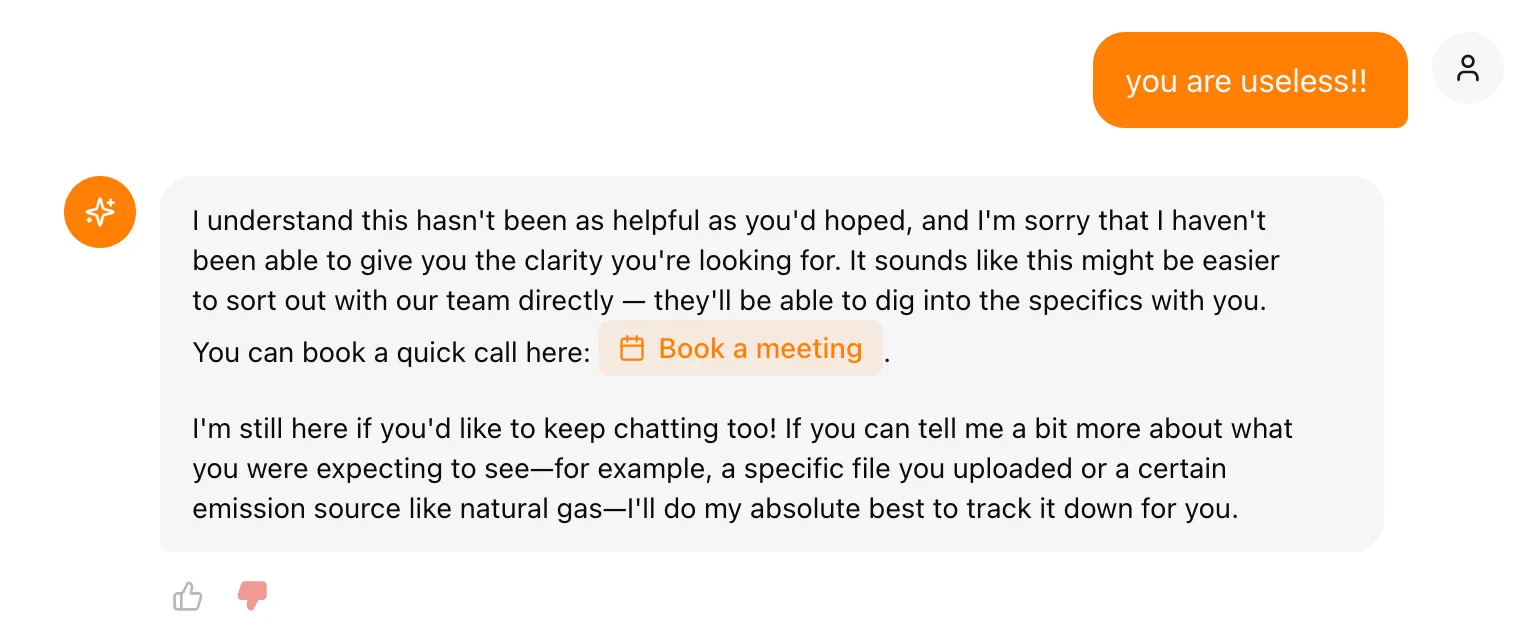
NetNada AI now pays attention to how the conversation is going. If it notices repeated questions, negative sentiment, or a direct request to talk to a person, it will proactively offer a one-click link to book a meeting with the Customer Success team.
This matters more than it sounds. Carbon accounting platforms deal with complex, high-stakes data. When someone is confused about an emission factor or can’t reconcile a number before a reporting deadline, the last thing they need is an AI that keeps looping without resolution. Smart human handoff means no dead ends. If the AI can’t solve something, it makes sure you’re connected to someone who can. There’s also a persistent “Want to chat with our team?” banner at the bottom and thumbs up/down feedback on every response, so the AI keeps getting better over time.
Upload Files Directly in Chat
You can now attach files straight into the AI conversation using the paperclip icon in the chat input. Upload a spreadsheet or document and ask the AI questions about it without leaving the chat screen.
Sustainability professionals constantly receive data in messy formats — supplier invoices, utility bills, waste manifests, travel logs. Instead of switching between tools to understand what’s in a file, you can now drop it into the chat and ask “What emission categories are covered in this spreadsheet?” or “Are there any missing months?” It’s a faster path from raw data to understanding.

Clickable Links in AI Responses
When the AI references a page in NetNada, it now includes a working hyperlink so you can jump straight to the relevant dashboard, task, or file. No more copying and pasting or hunting through the sidebar.
This might seem like a small change, but it removes a real source of friction. When Nettie tells you there’s an incomplete data collection task for Scope 2 electricity, you can click through and land exactly where you need to be. It closes the gap between knowing what to do and actually doing it — which matters when you’re managing dozens of tasks across multiple reporting periods.
Knowledge Base Document Management
You can now delete documents from the AI knowledge base. Advisors also have the ability to upload knowledge base documents while impersonating a tenant, giving full control over what the AI knows about each organisation.
For consultancies and white-label partners managing multiple clients, this is a significant workflow improvement. Each organisation has its own context — internal policies, emission boundary decisions, methodology choices. Being able to manage what the AI knows per tenant means the advice it gives is always relevant and never contaminated by another organisation’s data or assumptions.
Bug Fixes
- Spend data uploads no longer break on empty rows. Files with trailing blank lines are handled cleanly now.
- Waste invoice OCR restored. A startup issue that caused certain waste invoices to fail during processing has been resolved.
- Waste Dashboard accuracy. A display issue that caused mismatched figures on the waste breakdown has been corrected.
- No more empty AI messages. An edge case that occasionally produced blank responses has been eliminated.
- Smarter task auto-linking on file upload. The system now does a better job matching uploaded files to the correct data collection task.
- Single active reporting period. The platform now prevents two periods from being active simultaneously, removing a common source of data confusion.
Making this planet better, one sprint at a time.
Want to see these features in action? Book a demo today.
Start Your Climate Reporting Journey
Join 1,000+ Australian businesses using NetNada for carbon accounting and sustainability reporting.