NetNada - August 12 2026 Product Release




This release is about trust in the numbers. We rebuilt how spend data is matched to emission factors, gave admins a way to re-run calculations on files already uploaded, opened up the currencies we accept, and closed a set of client issues.
Release window: August 12 2026 · Environments: Production
Smarter AI Matching for Spend Data
Purchased Goods and Capital Goods now get a far more careful answer. We audited the old calculator and found it picked one emission factor per supplier using only the supplier name. Taxis, flights and goods bought from the same supplier all received the same factor, and the answer could change between runs.
What's new
- Matches on full context — every purchase is matched on what was actually bought, not just who it was bought from
- Remembers past answers — recalculations are fast, free, and give the same result every time
- Records the reasoning — every line carries a proper audit trail of why the decision was made
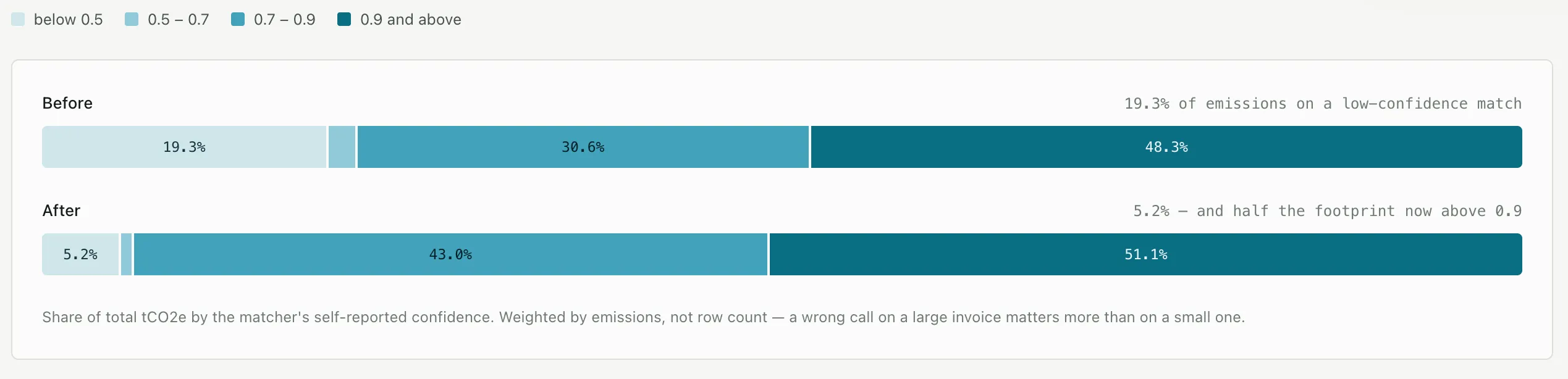
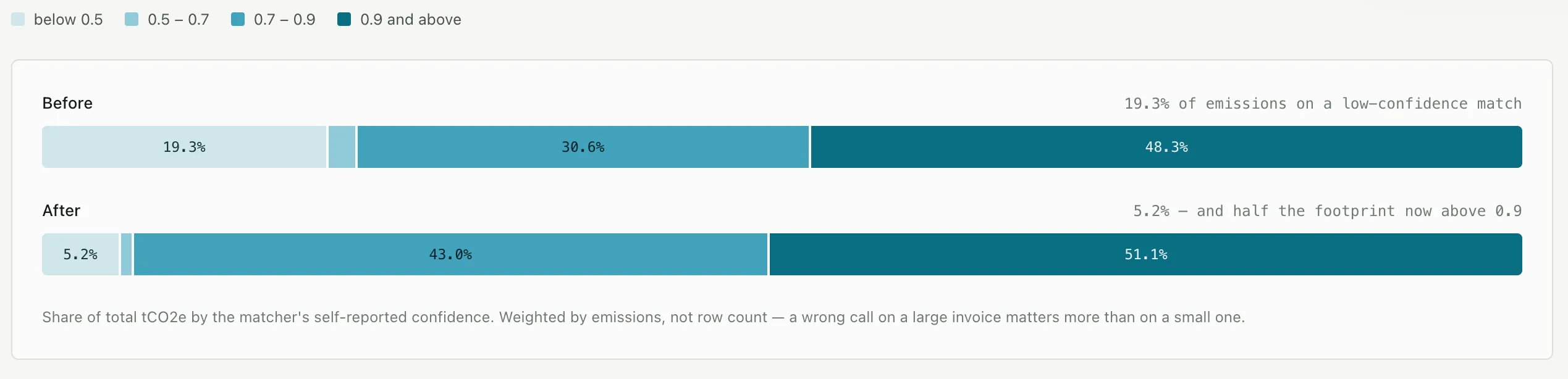
Measured across a representative ledger, emissions sitting on a low-confidence match dropped from 19.3% to 5.2%, and just over half the footprint now sits on a high-confidence match.
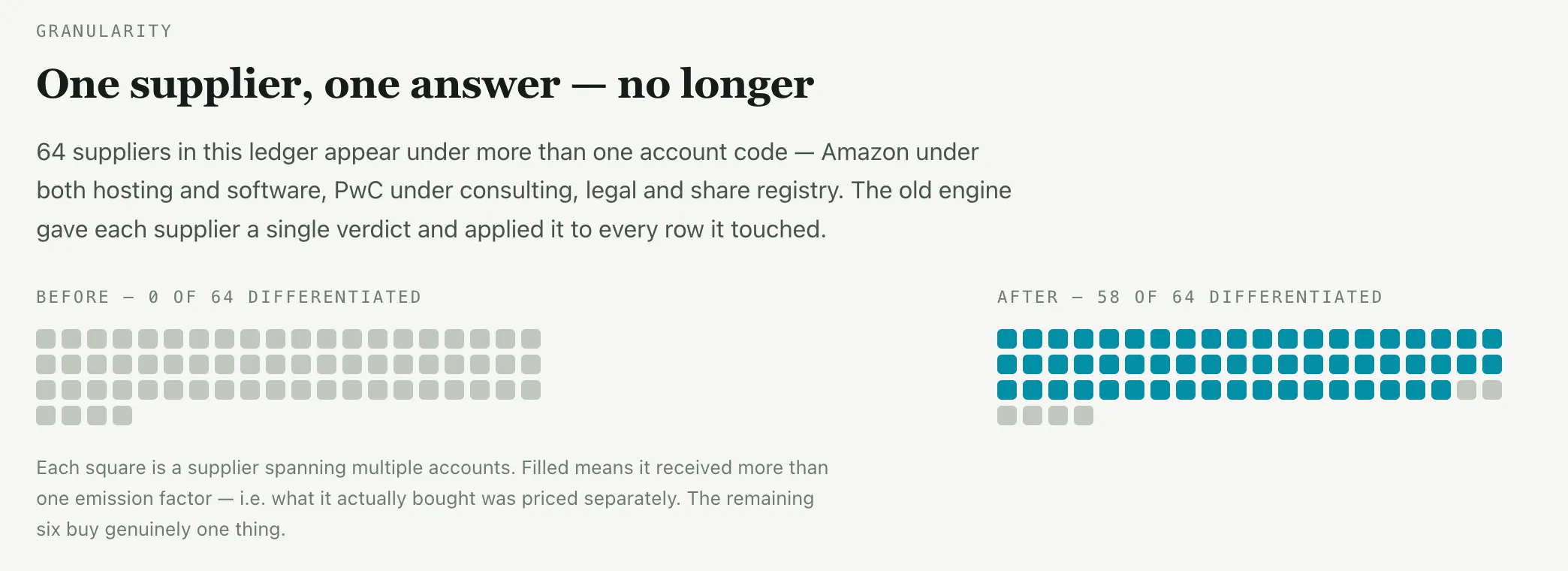
The clearest illustration is suppliers that span several account codes. In this ledger, 64 suppliers appear under more than one code — the old engine gave each of them a single verdict, while 58 are now priced separately according to what they actually sold.
Why it matters: spend-based estimates are the least precise part of most inventories. Pricing each purchase on what it actually was, and recording the reasoning, makes that part of the footprint defensible rather than approximate.
A Quality Check Tool for AI Calculations
We are starting to measure how good each AI run is, so we can compare, benchmark and improve over time.
- Grades a whole run — confirms no rows or dollars went missing, and checks the maths
- Ranks what to review — puts the AI decisions most worth a human look at the top of the list
Recalculate Files From the App
Admins can now re-run the calculation on files that are already uploaded, straight from the file list. Previously this worked only for electricity and only through a manual request, so nobody outside the engineering team could use it.
What's new
- Works across categories — the system determines the right data type itself, so you can select several files from different categories at once
- Live progress — a progress bar while it runs, then a per-file result at the end
- Safe by design — old lines are voided and replaced, and if a file fails, the previous numbers are left untouched
Select the files you want and the Recalculate action appears in the toolbar alongside download and delete.
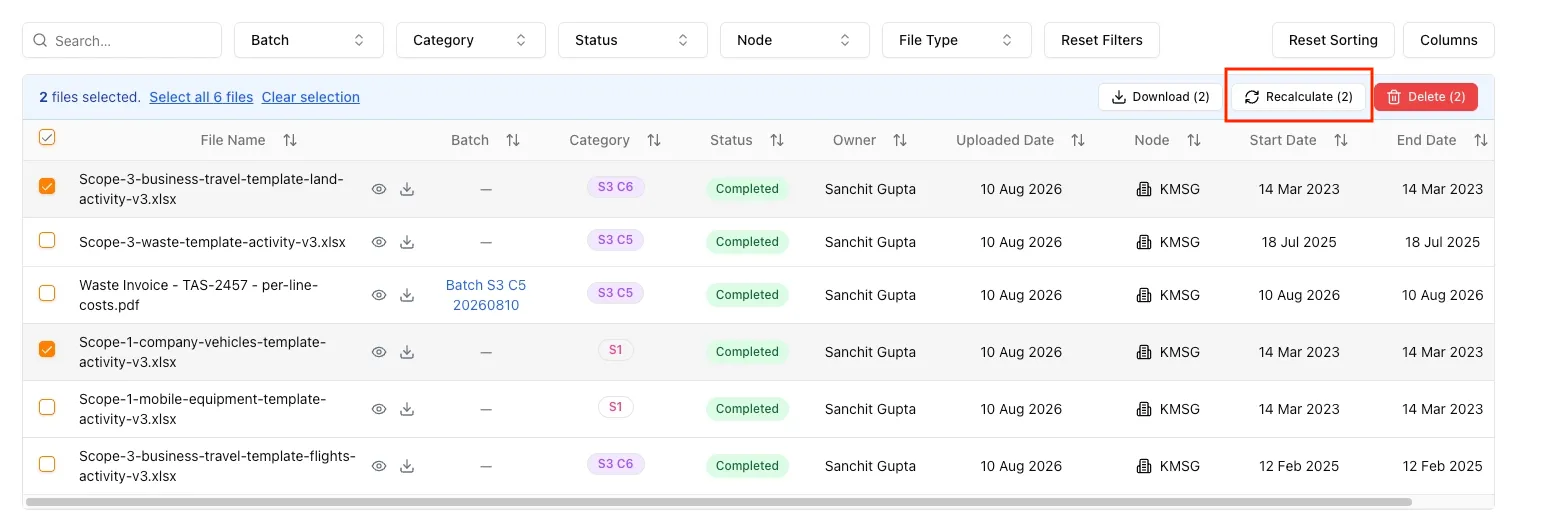
When the run finishes, each file reports its own outcome — recalculated, skipped with the reason why, or failed without touching the existing figures.
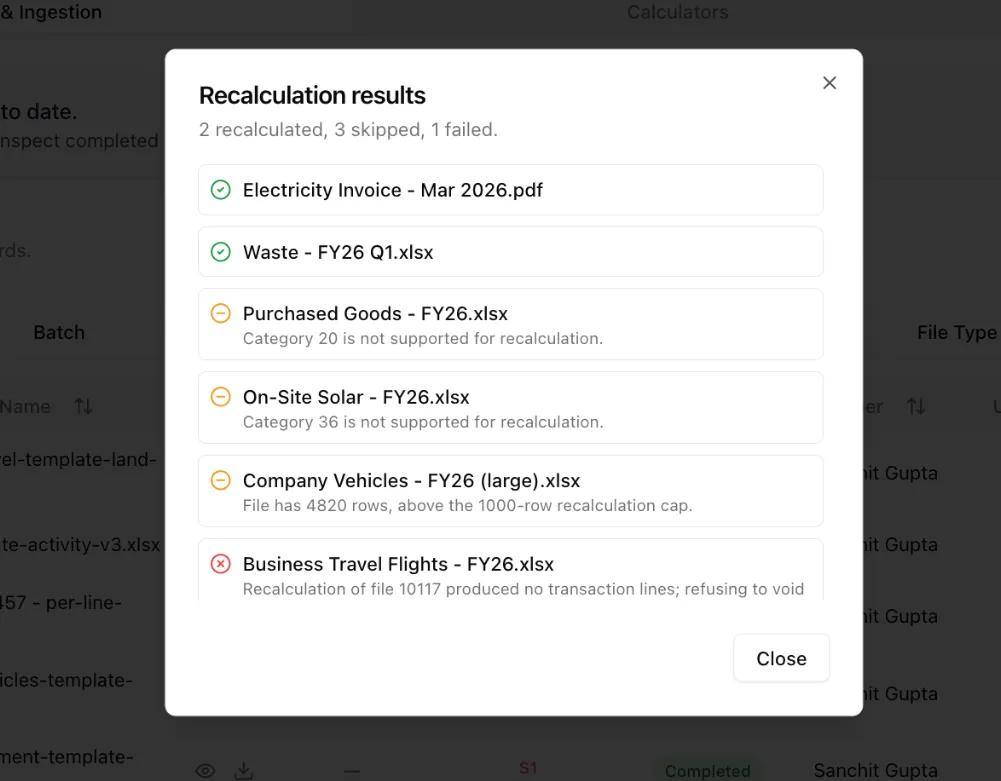
Why it matters: when a calculator improves, those better numbers can now be pushed onto files that were uploaded months ago.
More Currencies Accepted on Upload
Uploads previously accepted only nine currencies, which caused genuine client files to fail.
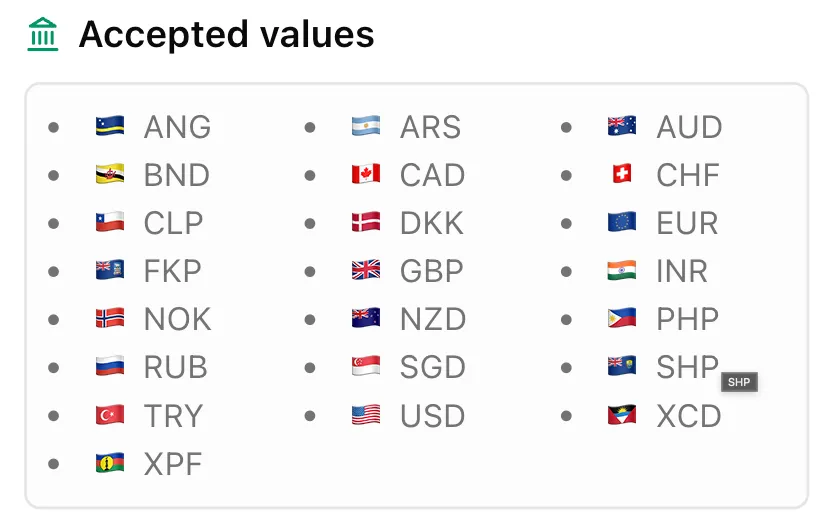
- 22 currencies now accepted, up from nine
- One simple rule — a currency is accepted only where we hold exchange rates for it, so nothing can quietly convert at the wrong value
- A hidden bug fixed — one exchange rate had been stored as a broken number for years; it has been found and repaired
- Templates updated — the currency dropdowns in the download templates now match exactly what the system accepts
Optional Cost Field on More Templates
We checked every upload method to see which ones allow a cost to be entered. Six were missing it, which made it hard to reconcile data against your own invoices.
- Added to six methods — company vehicles, mobile equipment, business travel (land), business travel (flights), and both waste methods
- Cannot affect your numbers — cost is used only for reconciliation, so it can never change an emissions result
- Skipped deliberately — solar and employee commuting, because there is no invoice to match against
Client Fixes
Three issues raised by clients, each affecting numbers that auditors work from:
- Audit accuracy — a dashboard total did not match the audit export, and the export contained duplicated transaction lines. The cause was a slow connection allowing the same action to fire several times and create duplicate data. Dashboard and export now agree, which matters because the export is what the auditor works from.
- Scope 2 review — an emission factor mismatch reported in the same review was investigated and closed.
- Gas invoices — document reading could not pick up LPG consumption in kilograms from one supplier’s gas invoices, so those emissions were being missed entirely. They are now read correctly.
Smaller Fixes and Clean-Up
The less visible work that keeps things steady:
- Stuck files now fail cleanly instead of sitting in processing indefinitely
- Empty file uploads now fail correctly — uploading a blank file previously reported validation success
- Nettie no longer invents links; the chatbot was generating website addresses that do not exist and sending people to broken pages. Links now always point at the real app
- A round of routine security hardening across backend routes
- Investigations closed: white-label users, testing coverage improvements, and an audit of Business Travel (Land)
If you notice anything unexpected post-release, please share the tenant/org, page URL, steps to reproduce, and a screenshot if possible.
Making this planet better, one sprint at a time. 🌏
Want to see these features in action? Book a demo today.
Start Your Climate Reporting Journey
Join 1,000+ Australian businesses using NetNada for carbon accounting and sustainability reporting.